Scaling Corporate Operations: Beyond Manual Data Entry and Spreadsheets
Scaling Corporate Operations: Beyond Manual Data Entry and Spreadsheets
Modern businesses are drowning in unstructured data. Statistics show that roughly 76% of employees spend 3+ hours daily moving data between systems, and 83% lose time fixing manual entry errors. To remain competitive, organizations are shifting toward a unified framework of intelligent document processing and enterprise automation.
min. read
April 14, 2026
The Strategic Shift to Enterprise and Data Automation
Enterprise automation is the systematic replacement of manual, repetitive workflows with digital processes powered by Machine Learning (ML) and Robotic Process Automation (RPA). By integrating data automation, businesses can collect and organize information without human intervention, reducing operational costs by up to 30% while ensuring 100% data integrity for financial reporting.
The Hyperautomation Advantage: Leading organizations no longer view automation as a single tool but as a coordinated strategy. By combining machine learning and low-code platforms, companies can automate every possible business process, creating a "single source of truth" that allows for audit-ready accuracy across all departments without the "human element" causing rote entry mistakes.
Transitioning from Standard OCR to Intelligent Document Processing (IDP)
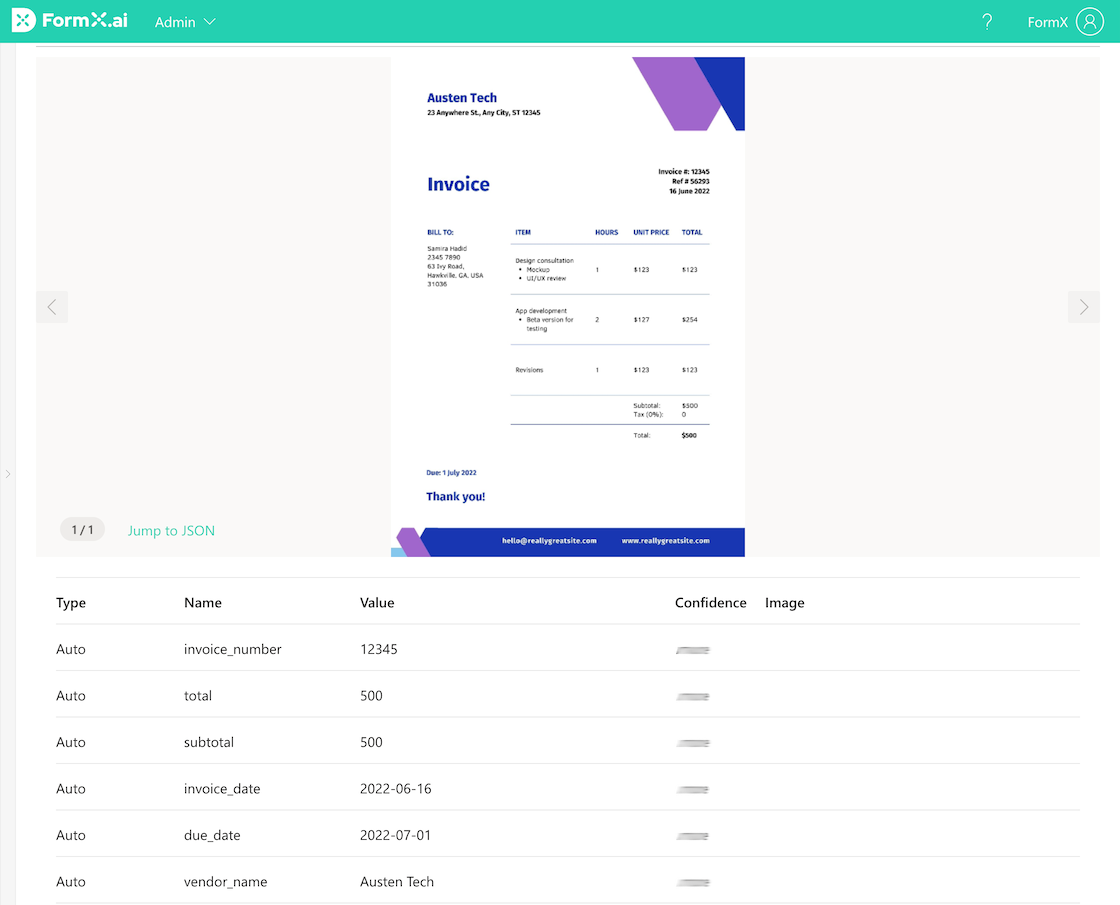
While traditional OCR software (Optical Character Recognition) converts images into raw text, Intelligent Document Processing (IDP) utilizes machine learning to understand the context of that text. This evolution allows for the automatic extraction of specific fields, such as "Net Amount" or "Vendor Name", directly into structured formats like JSON or CSV.
Technology
Capability
Best Use Case
Traditional OCR
Converts images to basic text strings.
Digitizing simple, typed documents.
Intelligent Document Processing (IDP)
Understands layout and contextual entities.
Complex invoices and bank statements.
FormX.ai (LLM-Powered)
Extracts structured data from any layout without code.
High-performance invoice OCR API & bank statement converter.
Big Tech (AWS/Google)
Large-scale table extraction and language support.
Mass digitization of archived records.
Optimizing Scalability through Automated Form Processing
The engine behind modern digital transformation is automated form processing software. Rather than manual input, these tools identify and validate data from both digital and physical forms, including tax filings or order fulfillment slips, integrating them directly into an existing CRM or ERP.
The Impact on Order Fulfillment & Tax Compliance:
By automating incoming orders from email or fax, companies reduce processing time and minimize costly shipping errors. Similarly, IDP drastically accelerates the processing of complex tax forms. Automating data validation ensures compliance during peak seasons without the need to increase administrative headcount, allowing for "Elastic Scaling" where a system can handle a 10x increase in volume instantly.
Financial Accuracy in Expense and Document Management
Optimizing the accounts payable process requires a specialized suite of expense automation tools. By deploying a receipt OCR or an invoice recognition API, finance teams can digitize the entire lifecycle of a transaction, from the initial scan to final reconciliation in the general ledger.
For insurance and financial auditing, the benefits are even more pronounced. In the insurance sector, IDP digitizes medical reports and claim forms to speed up backend processing, which is a critical factor since 41% of policyholders switch providers for better digital capabilities. Meanwhile, a bank statement converter allows auditors to turn months of unstructured PDF records into clean, analyzable Excel data in seconds, ensuring that no financial discrepancy goes unnoticed.
FAQ
Q: Can I convert PDF bank statements to Excel?
A: Yes. Using a specialized bank statement converter, you can transform unstructured PDF data into structured Excel or JSON formats. This is essential for transaction analysis and financial auditing.
Q: What is the difference between OCR and IDP?
A: OCR (Optical Character Recognition) converts images into raw text while IDP (Intelligent Document Processing) also utilises OCR technology but then uses AI to interpret that text, identifying the relationship between data points (e.g., matching a "Total" to a specific "Currency").
Q: How do I choose a data extraction software?
A: You should prioritize tools with high accuracy for your specific document types, like invoices or ID. If the software misses even small details, your team ends up spending more time manually fixing errors than they would have doing the work by hand.
Also, look for easy API integration that handles both structured and unstructured layouts. This is crucial because business data is rarely consistent; if the tool can’t adapt to different formats or "talk" to your existing software, it becomes a technical bottleneck rather than a solution that saves you time.
Privacy is important to us, so in accordance to our Privacy Policy, you have the option of disabling certain types of storage that may not be necessary for the basic function of the website. Blocking categories may impact your experience on the website.
Privacy is important to us, so you have the option of disabling certain types of storage that may not be necessary for the basic functioning of the website. Blocking categories may impact your experience on the website.