Upload a W-2 PDF or image. FormX reads every box - wages, withholdings, state taxes, employer details - and returns clean, structured Excel or JSON in seconds. Free to try.
What does this W-2 Extractor do?
This W-2 extractor reads IRS Form W-2 PDFs or image files and converts them into Excel or structure JSON automatically. Instead of manually transcribing Box 1 through Box 20, FormX uses OCR and AI to return the values in seconds. Used for income verification, year-end payroll processing, and feeding wage data directly into HR, accounting, and ERP systems.

Upload a single invoice to test the extractor, or call our REST API to process invoices at scale. No templates, no training required.

FormX AI identifies and extracts all invoice fields. Vendor, line items, totals, dates, PO references, and returns clean, structured JSON ready for your systems.

Download as Excel, CSV, or JSON for manual use, or pipe the API response directly into SAP, NetSuite, QuickBooks, or any ERP via webhook or batch processing.

Automate AP invoice processing directly into SAP. Eliminate manual data entry for your accounts payable team.

Push extracted invoice data into NetSuite automatically. Built for finance teams processing hundreds of invoices monthly.

Sync invoice data with QuickBooks in real time. Works with both Online and Desktop editions.

Connect invoice extraction to Dynamics 365 Finance & Supply Chain via REST API or webhook.

Full REST API with SDKs for Python, Node.js, Java, and .NET. Integrate with any system in hours, not weeks.
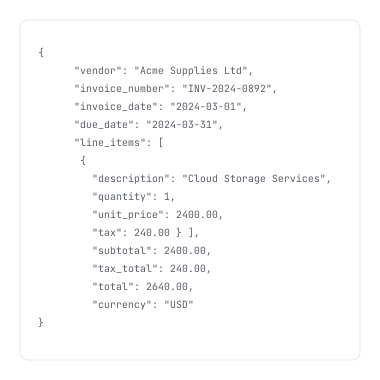


FormX can extract all data needed for businesses to expedite various application processes. These extraction items include but are not limited to the vendor or purchaser's name, total amount, issue date, due date, all transactions, and more. You can also customise or train our extractors to extract exactly what you need. Get in touch to learn more!
FormX can extract data from all kinds of Invoice with various layouts and formats as it is not a template-based solution. Training a new extractor is also simple and requires as little as one sample image. Schedule a Demo to see how simple it is to automate invoice data extraction.
FormX provides a full REST API that connects directly with SAP S/4HANA, SAP Business One, Oracle NetSuite, QuickBooks Online and Desktop, Microsoft Dynamics 365, and any other ERP system. SDKs are available for Python, Node.js, Java, and .NET. Contact us for pre-built integration guides for SAP and NetSuite.
The API returns a structured JSON object containing all extracted invoice fields: vendor name and address, invoice number, issue and due dates, line items (description, quantity, unit price, tax), subtotal, tax total, grand total, currency, and payment terms. Reach out to us to customise extracted fields through the FormX portal.
FormX combines OCR, Machine Learning, and Large Language Models to do more than convert invoices into machine-encoded text. It understands invoice content, identifies relevant data fields, and returns structured JSON, Excel, or CSV, ready for direct use in ERP systems or workflow automation.
Certainly. Invoice contains financial and personal data that should only be accessible to authorized parties. FormX does not use or store the extracted data in any permanent storage. We are also ISO27001 certified and SoC 2 Type 2 audited. Read our data privacy policy for more.
The API returns a structured JSON object containing all extracted invoice fields: vendor name and address, invoice number, issue and due dates, line items (description, quantity, unit price, tax), subtotal, tax total, grand total, currency, and payment terms. See our API documentation here. You can also customise extracted fields through the FormX portal.
Yes, FormX offers more advanced customisation and tailoring for you exact needs. We can process a wide range of documents including receipts, bank statement, tax slips, or anything else you require.
If you wish to integrate automated invoice data extraction with other applications, you can create a trial account or contact us to learn more about how FormX can be of help to your business.


Privacy is important to us, so you have the option of disabling certain types of storage that may not be necessary for the basic functioning of the website. Blocking categories may impact your experience on the website.


