Upload a P60 PDF or image. FormX reads every field - total pay, tax deducted, National Insurance contributions, employer details - and returns clean, structured Excel or JSON in seconds. Free to try. No signup needed.
What does this P60 Converter do?
This P60 converter reads HMRC Form P60 and automatically converts every field into structured data. No manual data entry required. FormX uses OCR and AI to return total pay, tax deducted, and National Insurance figures as Excel or JSON in seconds.
Need P45, P11D, or P60(Sub) conversion too? FormX supports all HMRC payroll forms. Get in touch and our team can set up a trial account for you.

Drop your P60 PDF, JPG, or PNG into the tool. Scanned copies, phone photos, and digital PDFs all work.

FormX AI reads the form, identifies each field, and validates the values for consistency.

Get your structured data as Excel or JSON - ready to import into your accounting software, mortgage application, or payroll system.

Lenders require P60s as proof of income for mortgage applications. FormX lets applicants upload their P60 and extract the key figures instantly - total pay and tax deducted - in the exact format brokers and lenders need, without manual transcription.

Accountants preparing self-assessment tax returns receive P60s from clients every April. FormX lets them convert P60 PDFs into structured data and feed figures directly into their tax preparation software, eliminating manual entry during the busiest period of the year.

HR teams verifying historical earnings or handling employee queries about previous tax years use FormX to extract P60 data from archived PDFs without manually reopening payroll records.

Letting agents and landlords request P60s as proof of income from prospective tenants. FormX integrates into referencing workflows to automatically extract and verify income figures at scale.

Banks and lenders use P60 data to verify income for personal loans, credit decisions, and account opening. FormX's API integrates directly into underwriting workflows to extract and validate P60 income data automatically.
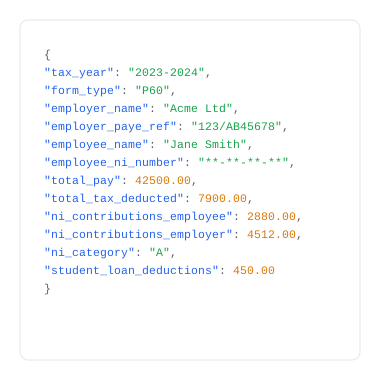


A P60 converter is a tool that automatically reads HMRC Form P60 and converts every field - total pay, tax deducted, National Insurance contributions, and employer details - into structured data without manual entry. FormX uses OCR and AI to convert P60 data into Excel or JSON in seconds. Get in touch to learn more!
FormX converts all standard P60 fields including employee name and NI number (masked), employer name and PAYE reference, total pay, total tax deducted, employee and employer NI contributions, NI category letter, statutory payments, and student loan deductions. Schedule a Demo to see how simple it is to automate P60 form extraction.
FormX accepts PDF, JPG, and PNG. This includes scanned paper P60s, photographs taken on a phone, and digitally generated PDFs from payroll software such as Sage, Xero, QuickBooks, and ADP. Contact us for integrating with different tools to automate your process.
Yes - the free tier allows single P60 conversion with no signup required. Batch processing of multiple P60s and API access require a free trial account. Reach out to us and we can setup a demo account for you.
FormX is ISO 27001 and SOC 2 Type II certified. All uploaded documents are encrypted in transit (TLS 1.2+) and at rest (AES-256). National Insurance numbers are masked in all output by default. Documents are not retained after conversion. Read our data privacy policy for more.
Yes. FormX provides a REST API that accepts P60 PDFs and returns structured JSON - making it a P60 extractor suitable for enterprise integration. The API connects with Sage, Xero, Workday, BambooHR, Microsoft Dynamics 365, Zapier, and N8N. API documentation is available at here. You can also customise extracted fields through the FormX portal.
A P60 is issued by your employer at the end of each tax year (5 April) and summarises your total pay and tax for that year. A P45 is issued when you leave a job and shows your pay and tax up to your leaving date. FormX can process both document types.
Yes. FormX lets you customise exactly which fields to extract and how the output is structured.
Contact us to setup a trial account for you.


Privacy is important to us, so you have the option of disabling certain types of storage that may not be necessary for the basic functioning of the website. Blocking categories may impact your experience on the website.


