

1099 Extractor
Pull Every Field from Any 1099
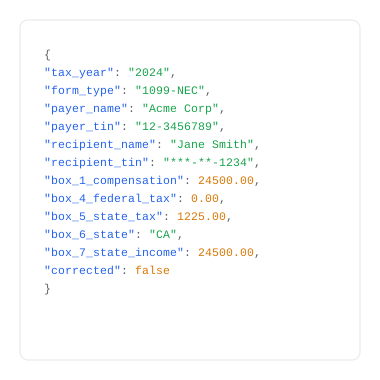
Upload a form 1099-NEC PDF or image. FormX reads every box - payer details, income amounts, federal and state tax withholding - and returns structured data instantly.
What does this Form 1099 Extractor do?
How the 1099 Extractor Works

Upload

Extraction

Download
Use Cases

Freelancers & Self-Employed

Accounting & Tax Firms

HR & Payroll Teams

Gig Workers & Platform Earners

Financial Services & Banking
1099 vs W-2 — What's the Difference?






Get started with FormX.ai
Frequently Asked Questions
What does this 1099 extractor do?
This AI powered form 1099 OCR data extractor automatically reads IRS Form 1099 and pulls out the data inside each field - payer details, income amounts, and tax withholdings - without manual data entry. FormX uses OCR and AI to extract and structure 1099 data in seconds. Get in touch to learn more!
What 1099 fields does FormX extract?
FormX extracts all standard 1099-NEC fields including payer and recipient details, Box 1 through Box 18, federal and state tax withholdings, and header information including tax year and form type. Schedule a Demo to see how simple it is to automate 1099 form extraction.
What file formats does the 1099 extractor accept?
FormX accepts PDF, JPG, and PNG. This includes scanned paper 1099s, photographs taken on a phone, and digitally generated PDFs from payer systems. Both standard and corrected 1099 forms are supported. Contact us for integrating with different tools to automate your process.
Is it free to extract 1099 data?
Yes - this free tool allows single 1099 extraction with no signup required. Batch processing of multiple 1099s and API access require a free trial account. Reach out to us and we can setup a demo account for you.
Is it safe to upload 1099 forms?
FormX is ISO 27001 and SOC 2 Type II certified. All uploaded documents are encrypted in transit (TLS 1.2+) and at rest (AES-256). Documents are not retained after extraction. Read our data privacy policy for more.
Can FormX extract 1099 data via API for batch processing?
Yes. FormX provides a REST API that accepts 1099 PDFs and images, returning structured JSON or Excel. API documentation is available at here. You can also customise extracted fields through the FormX portal.
What is the difference between a 1099 and a W-2, and can FormX extract both?
A W-2 is issued by employers to employees and reports wages and tax withholdings. A 1099 is issued to independent contractors and reports non-employment income. FormX extracts data from both form types. If you receive 1099s alongside W-2s, FormX can process them within the same workflow.
Contact us to setup a trial account for you.
What 1099 variants does FormX support?
FormX extracts data from all major 1099 variants: 1099-NEC, 1099-MISC, 1099-INT, 1099-DIV, 1099-R, 1099-K, 1099-B, and 1099-S. FormX identifies the form variant automatically — no separate extractors needed per type. Contact us to see a demo.
How does FormX compare to Affinda or DocuClipper for 1099 extraction?
FormX, Affinda, and DocuClipper all extract 1099 data. FormX differentiates on no-template setup, >95% accuracy across all payer formats, and a REST API that integrates directly with QuickBooks, TaxBandits, Tax1099, ADP, and Gusto. Corrected 1099s and multi-payer packets in a single upload are also supported. Schedule a demo to compare directly.