
ZUGFeRD Extraction API: How to Parse XML from German E-Invoices
A technical guide to ZUGFeRD extraction: how to pull structured XML from hybrid PDF invoices, handle ZUGFeRD profiles, and process mixed ZUGFeRD and flat PDF workflows via API.
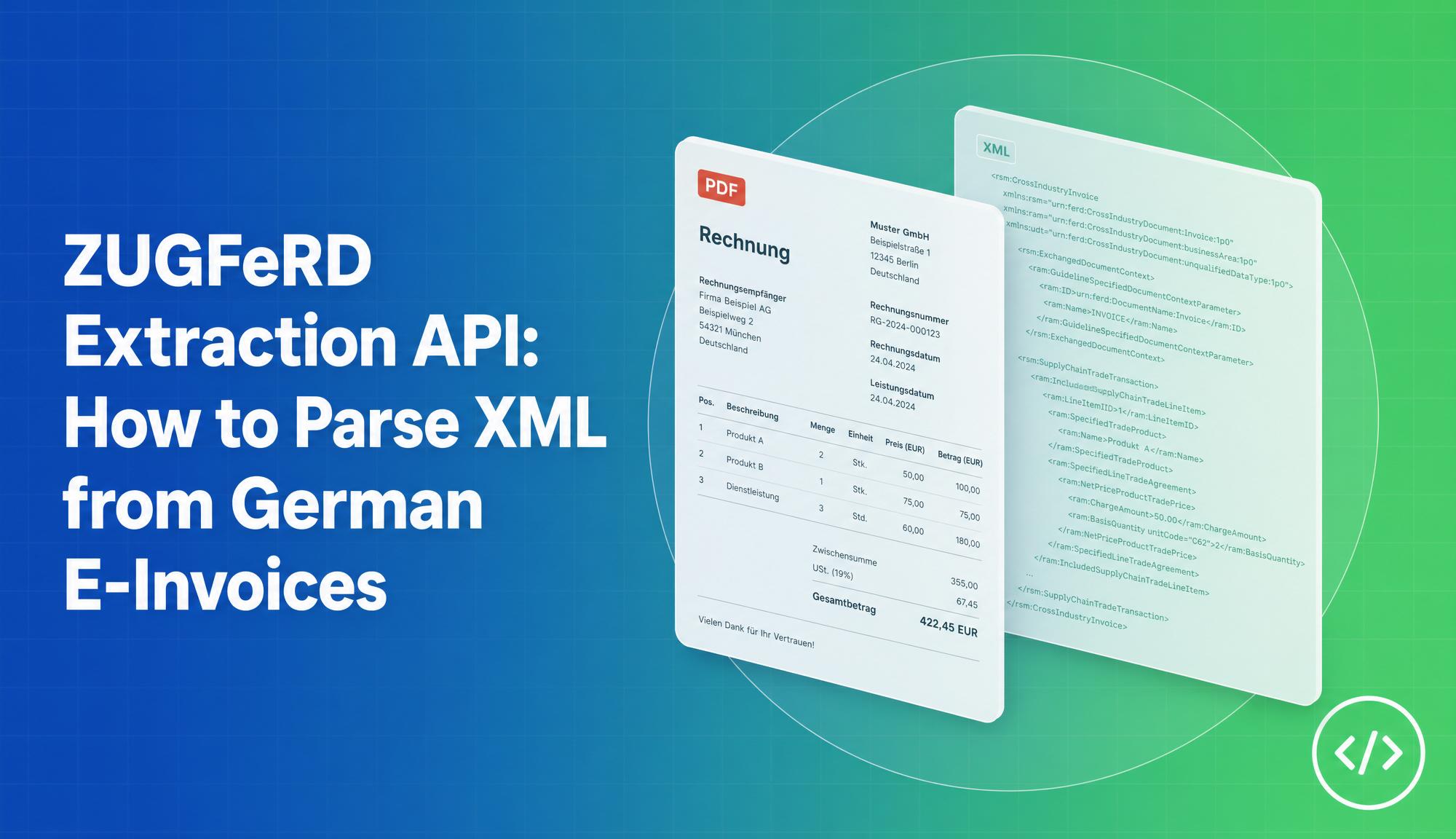
Germany’s B2B e-invoicing mandate is forcing businesses at every tier of the supply chain to rethink how they process incoming invoices. The ZUGFeRD format, which embeds structured XML data inside a human-readable PDF, is one of the dominant formats for this transition. But for businesses receiving ZUGFeRD invoices and needing to feed that data into ERP, accounting, or AP automation systems, extraction is not a simple OCR problem. The data is already structured; the challenge is getting it out cleanly and reliably at scale.
This guide explains how ZUGFeRD extraction works, why it is different from standard OCR, how to handle the various ZUGFeRD profiles, and what a production extraction pipeline looks like for mixed ZUGFeRD and flat PDF workflows.
What ZUGFeRD Is (and How It Is Structured)
ZUGFeRD stands for Zentraler User Guide des Forums elektronische Rechnung Deutschland. It is a hybrid electronic invoice standard that packages two representations of the same invoice into a single PDF/A-3 file:
- The PDF layer is a human-readable invoice formatted for display or printing. Any standard PDF viewer can open it.
- The XML layer is a machine-readable invoice embedded as a file attachment inside the PDF. It follows the UN/CEFACT Cross Industry Invoice (CII) schema and contains all invoice fields in structured, tagged format.
This dual structure is the whole point of ZUGFeRD. Pure XML formats like XRechnung require every recipient to have compatible software. Pure PDF invoices force manual data entry or unreliable OCR. ZUGFeRD lets senders issue one file that works regardless of the recipient’s technical maturity.
For extraction purposes, this means you do not need OCR for ZUGFeRD. The data is already structured in the embedded XML. What you need is an extraction pipeline that: (1) detects that the PDF contains an embedded XML attachment, (2) pulls the XML out of the PDF container, and (3) parses and normalises the XML fields into your target schema.
ZUGFeRD Profiles: What Changes Between Them
ZUGFeRD defines six profiles with increasing data richness. Which profile a supplier uses determines how many fields are available in the extracted XML.
| Profile | Data richness | EN 16931 compliant | Typical use |
|---|---|---|---|
| MINIMUM | Basic metadata only | No | Inter-company (Germany only) |
| BASIC WL | Line items without VAT detail | No | Simple B2B invoices |
| BASIC | Line items with VAT | No | Standard invoices |
| EN 16931 (COMFORT) | Full EU standard fields | Yes | Cross-border EU compliance |
| EXTENDED | Fields beyond EU standard | Yes | Complex supply chains |
| XRECHNUNG | Pure XML, no PDF | Yes | German public sector |
For compliance with Germany’s B2B e-invoicing mandate, only EN 16931 (COMFORT) profile and above are sufficient. Most supplier invoices you will receive in practice are BASIC or EN 16931.
An extraction API should identify the profile and adjust its field mapping accordingly, since field availability differs between profiles. A MINIMUM invoice does not contain line items; a BASIC WL invoice omits VAT breakdowns.
ZUGFeRD 1.0 vs 2.x vs Factur-X
There are three naming variants in common use, and they cause real confusion in extraction workflows:
ZUGFeRD 1.0 (older): Uses the ZUGFeRD-invoice.xml filename and a different namespace structure. Still common in invoices issued before 2020.
ZUGFeRD 2.x (current): Version 2.0 still used zugferd-invoice.xml, but from 2.1 onwards the filename switched to factur-x.xml to align with Factur-X. The current version is 2.3.3, released May 2025.
Factur-X: France’s e-invoicing standard. Since ZUGFeRD 2.1, ZUGFeRD and Factur-X are fully harmonised: they use identical file structures with identical XML. The only difference is the label.
An extraction API that only handles ZUGFeRD 2.x will fail silently on ZUGFeRD 1.0 invoices because the XML filename and namespace differ. Production extraction pipelines need to handle all three variants.
Key Fields in ZUGFeRD XML
Once the XML is extracted, the fields you need for AP automation are:
Invoice header:
InvoiceNumber: seller’s reference numberInvoiceDate: issue dateDueDate: payment due dateDeliveryDate(Leistungsdatum): service/delivery date, required for German VAT complianceBuyerReference(Leitweg-ID): required for public sector XRechnung routing
Seller information:
SellerNameSellerTaxNumber(Steuernummer): German tax registration numberSellerVATID(USt-ID): EU VAT identification numberSellerIBAN,SellerBIC: payment details
Line items (per item):
DescriptionQuantityandUnitUnitPrice(net)TaxRate(e.g. 19%, 7%, 0%)NetAmount,GrossAmount
Totals:
TaxBasisAmount(net total)TaxAmountGrandTotalAmount(gross total)
What the Extracted JSON Looks Like
A ZUGFeRD extraction API should normalise the raw XML into a clean JSON structure regardless of which profile or version the input uses:
{
  "document_type": "ZUGFeRD",
  "profile": "EN 16931",
  "version": "2.3.3",
  "invoice_number": "RE-2024-0042",
  "invoice_date": "2024-11-15",
  "due_date": "2024-12-15",
  "delivery_date": "2024-11-10",
  "seller": {
    "name": "Muster GmbH",
    "tax_number": "12/345/67890",
    "vat_id": "DE123456789",
    "iban": "DE89370400440532013000",
    "bic": "COBADEFFXXX"
  },
  "buyer": {
    "name": "Beispiel AG",
    "buyer_reference": "04011000-12345-34"
  },
  "line_items": [
    {
      "position": 1,
      "description": "Beratungsleistung November 2024",
      "quantity": 5,
      "unit": "HUR",
      "unit_price_net": 120.00,
      "tax_rate": 19,
      "net_amount": 600.00,
      "gross_amount": 714.00
    }
  ],
  "totals": {
    "net": 600.00,
    "tax": 114.00,
    "gross": 714.00
  }
}
This structure maps directly to the fields required for ERP import, three-way matching, or accounting software entry.
Handling Mixed Workflows: ZUGFeRD and Flat PDFs
In practice, not all your incoming invoices will be ZUGFeRD. Many suppliers, especially smaller businesses and non-German companies, still send plain PDF invoices with no embedded XML. A production extraction pipeline needs to handle both.
The strategy differs depending on the input:
ZUGFeRD invoices: Extract the embedded XML directly. No OCR required. High accuracy because the data is already structured.
Flat PDF invoices: No XML to extract. OCR is required to read the text, followed by field classification to map extracted text to invoice fields. Accuracy is lower and varies by scan quality and layout consistency.
The failure mode to design for is treating all incoming PDFs as flat. If a ZUGFeRD invoice is processed through an OCR pipeline instead of XML extraction, you get lower accuracy, miss line items on long invoices, and potentially misread German tax numbers. An extraction API should auto-detect whether the incoming PDF contains an embedded XML attachment and route accordingly.
Processing ZUGFeRD Invoices in n8n and Power Automate
For teams using workflow automation tools, ZUGFeRD extraction fits naturally as a single API call node in a larger pipeline:
- Trigger: new email attachment or file in SharePoint/Google Drive
- Check: does the file contain embedded XML? (ZUGFeRD detection)
- Extract: POST the file to extraction API, receive structured JSON
- Map: transform JSON fields to ERP or accounting software import format
- Route: auto-approve high-confidence extractions, flag low-confidence for review
This pattern works in n8n, Power Automate, Make (Integromat), and Zapier. The extraction step is the same regardless of which automation tool you use: a single HTTP POST with the PDF as the body, returning JSON.
How FormX Handles ZUGFeRD Extraction
FormX is a document data extraction API with native support for ZUGFeRD invoices across all profiles and versions. For incoming ZUGFeRD invoices, FormX:
- Auto-detects ZUGFeRD 1.0 and 2.x (including Factur-X) from the embedded XML attachment
- Normalises fields from all six profiles into a consistent JSON schema
- Extracts German-specific fields including Steuernummer, Leistungsdatum, and IBAN
- Falls back to OCR extraction for flat PDF invoices in the same pipeline
- Returns per-document confidence scores and field-level flags
For businesses with suppliers that have not yet adopted ZUGFeRD, FormX handles both formats transparently in a single API endpoint, with no separate pipeline required for ZUGFeRD vs flat PDF.
The receiving obligation for ZUGFeRD in German B2B has been in effect since January 2025. If you are still processing incoming ZUGFeRD invoices manually or through a generic OCR tool, now is the time to implement a proper extraction pipeline.
Try the free FormX invoice extraction tool to test ZUGFeRD and flat PDF extraction with no signup required, or schedule a demo to walk through your specific invoice workflow.
Latest articles